Comparison
A Huckleberry alternative for the pumped milk half
Huckleberry is an all-in-one baby tracker: its listing describes sleep, feeds, diapers and pumping, plus predictions for nap and sleep timing. Milkloft does one of those things and does not attempt the rest: the milk you pumped, where it is stored, which bag comes out next and when each one reaches its estimated limit. People arrive at this page when the freezer is the part their tracker never really handled.
We make Milkloft. This page is our honest read, not a review: check the App Store for today’s facts.
Milkloft does this for you The iPhone app for your stored breast milk. One purchase, no account.In one line
| Milkloft | Huckleberry | |
|---|---|---|
| What it is built around | The stored milk: bags, places, dates | The baby’s whole day: sleep, feeds, diapers, pumping |
| Pricing model | A free tier, then one purchase, no subscription | Free with in-app purchases: Plus and Premium entries |
| Where your data lives | Your iPhone and your own iCloud, no account | Not described in the listing |
What each one is for
| Milkloft | Huckleberry | |
|---|---|---|
| Sleep, feeds, diapers, growth | None of them | Yes, that is the app |
| Sleep and nap predictions | No | Yes, per the listing |
| Platform | iPhone only | iPhone, iPad, Apple Watch and Android |
| Inventory by place | Yes: 5 places free, unlimited with Pro | Not described in the listing |
| Which bag to use first | Yes: thawed, fridge, then oldest frozen | Not described in the listing |
| Use-by date with a named guideline | Yes: CDC, ABM or NHS, selectable | Not described in the listing |
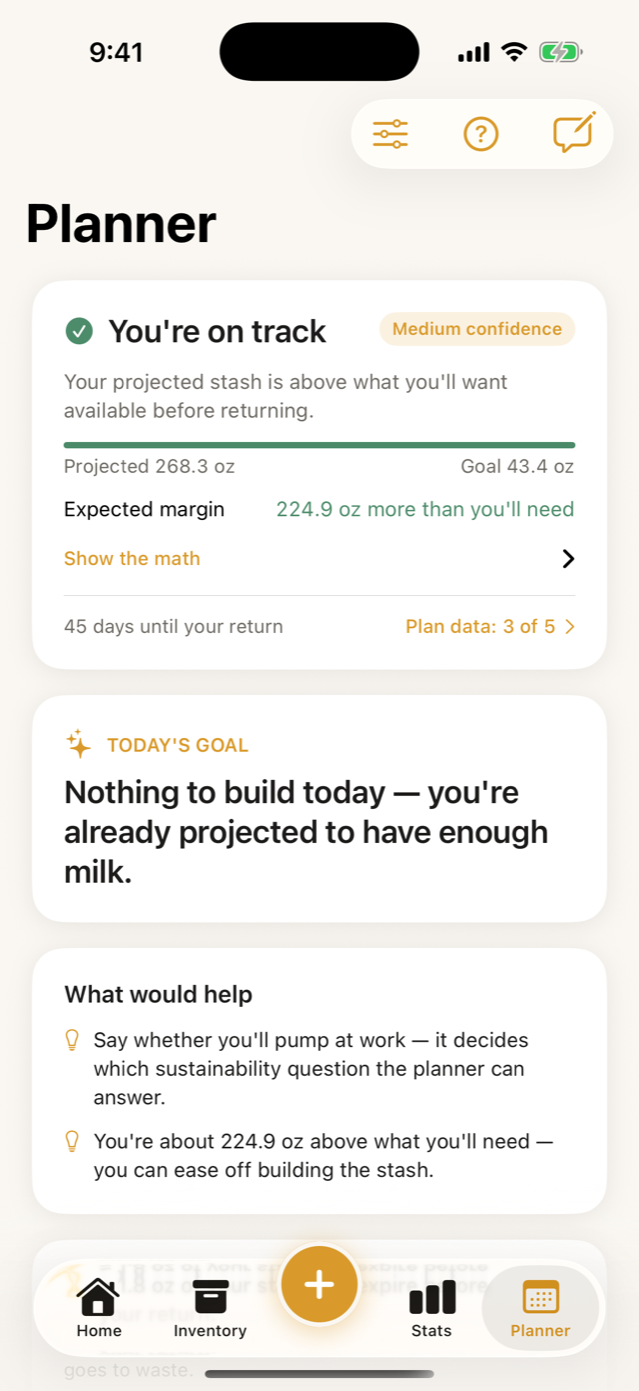
| Return-to-work projection | Yes: the verdict is free, the plan is Pro | Not described in the listing |
| Works offline with no account | Yes, both | Not described in the listing |
| Export your data | CSV and JSON, on the free tier | Not described in the listing |
| Spanish | Yes | The listing lists English |
Stay with Huckleberry if…
- You want one app for the whole day, and splitting the baby’s record in two would annoy you more than the freezer does.
- The sleep guidance is what you actually open it for.
- Someone in the house is on Android. Milkloft has no Android version, and that decides it.
Switch to Milkloft if…
- The stash is the part your tracker never handled, and you keep doing that arithmetic in your head.
- You would rather not pay on a recurring basis for a list of what is in your freezer.
- You want a use-by date that names the guideline it came from, and the option to change that source.
- You are going back to work and want the milk you have projected against that date.
- You want it in Spanish, or you want it working with no account and no signal.
What Milkloft doesn't do
- No sleep, no naps, no diapers, no growth charts, and no advice about any of them.
- No pumping timer and no connection to your pump.
- iPhone only: no Android and no web app.
- No Apple Watch app in this release.
- Not on the App Store yet, so the button here joins a waiting list.
Why one app rarely does both
A baby tracker is built around events in a day: a feed at four, a nap at six. A stash app is built around objects that persist: a bag pumped in July that has to be found and used in October. Those are different data models and different screens, and an app that starts as one tends to bolt the other on as a counter.
That is not a criticism of anyone. It is the reason we built a smaller app rather than a bigger one, and the reason this page tells you to keep the tracker you like if the whole day is what you need tracked.
What we would not claim
Everything in the table above about Huckleberry comes from its App Store listing and its own site, read on September 8, 2026. Where those do not describe a feature, the row says so rather than saying the app lacks it, because a listing is a summary and not a specification. If something here is out of date, write to us and we will change it.
Frequently asked questions
Is there a Huckleberry alternative just for pumped milk?
Milkloft does one part of the day rather than all of it: the milk you pumped and stored. Huckleberry’s listing describes sleep, feeds, diapers and pumping in one app, and does not describe an inventory of stored milk by place, a use-first order or expiration dates.
Does Milkloft track sleep, diapers or growth?
No, none of them, and it will not. It tracks the milk. If you want the whole day in one app, an all-in-one tracker is the right shape and this is not it.
Can I keep Huckleberry for sleep and use Milkloft for the freezer?
Yes, and that is how we expect most people would use it. They do not overlap much: one is the baby’s day, the other is the freezer inventory.
Is Huckleberry a subscription?
Its App Store listing shows it as free with in-app purchases and lists Plus and Premium entries; the billing period is not visible on the listing. Check the listing for what applies to you. We do not publish prices for anyone, ours included.
Does Milkloft have an Android version?
No. It is iPhone only, and Huckleberry lists both iPhone and Android. If the person sharing the load is on Android, that difference matters more than any feature row.
Keep reading
- The best breast milk tracking apps, compared on what you can check
- Milkloft for going back to work
- Why Milkloft is one purchase, not a subscription
- Breast milk storage chart (CDC guidelines)
- How much breast milk should I have saved before going back to work?
- How to label breast milk bags (and why a QR beats a Sharpie)
- All guides
Facts about other apps checked on September 8, 2026 in the App Store listing and the developer's own site. Something changed? Tell us: [email protected] App names are trademarks of their owners and are used only to identify them.